'%3e%3cpath%20d='M904%200H120C53.7258%200%200%2053.7258%200%20120V904C0%20970.274%2053.7258%201024%20120%201024H904C970.274%201024%201024%20970.274%201024%20904V120C1024%2053.7258%20970.274%200%20904%200Z'%20fill='%23050816'/%3e%3cpath%20d='M430%20190L390%20135'%20stroke='%238B5CF6'%20stroke-width='28'%20stroke-linecap='round'/%3e%3cpath%20d='M512%20165V95'%20stroke='%238B5CF6'%20stroke-width='28'%20stroke-linecap='round'/%3e%3cpath%20d='M594%20190L634%20135'%20stroke='%238B5CF6'%20stroke-width='28'%20stroke-linecap='round'/%3e%3cpath%20d='M512%20250C380%20250%20320%20350%20320%20500V620C320%20720%20260%20790%20220%20840H804C764%20790%20704%20720%20704%20620V500C704%20350%20644%20250%20512%20250Z'%20stroke='white'%20stroke-width='26'%20stroke-linecap='round'%20stroke-linejoin='round'/%3e%3cpath%20d='M430%20840C430%20900%20470%20940%20512%20940C554%20940%20594%20900%20594%20840'%20stroke='white'%20stroke-width='26'%20stroke-linecap='round'/%3e%3cpath%20d='M566%20410V700'%20stroke='white'%20stroke-width='22'%20stroke-linecap='round'/%3e%3cpath%20d='M566%20418C581.464%20418%20594%20405.464%20594%20390C594%20374.536%20581.464%20362%20566%20362C550.536%20362%20538%20374.536%20538%20390C538%20405.464%20550.536%20418%20566%20418Z'%20fill='%23050816'%20stroke='white'%20stroke-width='18'/%3e%3cpath%20d='M566%20748C581.464%20748%20594%20735.464%20594%20720C594%20704.536%20581.464%20692%20566%20692C550.536%20692%20538%20704.536%20538%20720C538%20735.464%20550.536%20748%20566%20748Z'%20fill='%23050816'%20stroke='white'%20stroke-width='18'/%3e%3cpath%20d='M412%20533C412%20580.124%20412%20623.288%20412%20670.361L412%20723H485'%20stroke='%238B5CF6'%20stroke-width='22'%20stroke-linecap='round'%20stroke-linejoin='round'/%3e%3cpath%20d='M464%20698L506%20723L464%20748'%20stroke='%238B5CF6'%20stroke-width='15'%20stroke-linecap='round'%20stroke-linejoin='round'/%3e%3cpath%20d='M412%20533C427.464%20533%20440%20520.464%20440%20505C440%20489.536%20427.464%20477%20412%20477C396.536%20477%20384%20489.536%20384%20505C384%20520.464%20396.536%20533%20412%20533Z'%20fill='%23050816'%20stroke='%238B5CF6'%20stroke-width='18'/%3e%3c/g%3e%3cdefs%3e%3cclipPath%20id='clip0_401_2'%3e%3crect%20width='1024'%20height='1024'%20fill='white'/%3e%3c/clipPath%3e%3c/defs%3e%3c/svg%3e)
Routing
Preferences
Workspace-wide settings that apply to every mapped repository and connected git provider. Open Routing > Preferences in the dashboard.
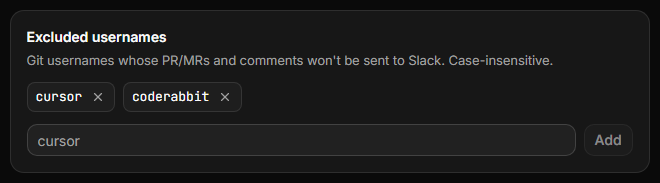
Excluded usernames
Blocklist git usernames whose PRs/MRs and comments should not be sent to Slack. Useful for bots and automation accounts. Matching is case-insensitive. You can exclude up to 50 usernames per workspace.
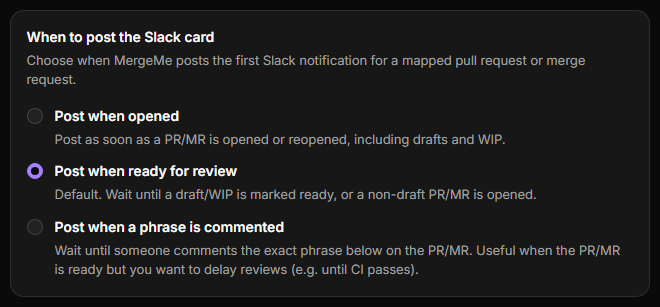
When to post the Slack card
Workspace-wide control over the first Slack card for each PR/MR:
- Post when opened - including drafts/WIP
- Post when ready for review - default; waits for draft/WIP to be marked ready
- Post when a phrase is commented - waits until a PR/MR comment exactly matches your configured phrase (case-insensitive, trimmed).
This interacts with label routing: label rules are evaluated when the card is first posted (on open, ready_for_review, or when the phrase comment arrives).
Show PR / MR number in card title
On by default. Include the PR/MR number in the Slack card heading (for example !3723 Edit README on GitLab or #42 Edit README on GitHub). Turn off for title-only headings.

Show CI status on Slack cards
Off by default. When enabled, MergeMe adds a CI line to each posted PR/MR card (for example CI: Running (2/5)). If optional (non-blocking) checks exist, a second bucket appears, such as Optional CI: Passed (1/1). The line updates in place as GitHub checks or GitLab pipelines run and finish. It is display-only - CI does not change review status, card color, or thread behavior, and it does not post extra Slack messages.

If CI data is missing (no pipeline yet, stale commit, or missing GitHub permissions), the row is hidden rather than showing an error.
- GitHub.com - MergeMe needs Checks: Read and Commit statuses: Read on the GitHub App. GitHub may prompt you to approve these after an app update. If you skip the prompt, cards keep working without the CI line. See GitHub setup.
- GitLab.com - New channel mappings register pipeline events automatically. Enable this preference, then open or update an MR so a pipeline webhook can populate the line.
- GitLab self-hosted - Enable Pipeline events on the group or project webhook in addition to merge request and comment events. See self-hosted setup.
Mirror Git comments in the Slack thread
MergeMe posts GitLab notes, GitHub issue comments, inline review comments, and review summaries as replies under the main Slack card. Replies already in the thread stay as they are. Phrase-trigger mode still posts the first card from the matching comment, and that trigger comment is not mirrored.

Post system messages in the Slack thread
MergeMe posts three system notices in the thread: "your review has been requested", "your review has been requested again", and "your PR/MR has been approved".

Status colours
Choose the sidebar colour on each Slack card for Open, Draft, In review, Partially approved, Approved, Changes requested, Merged, and Closed. Pick a preset or any #RRGGBB colour. Workspaces that leave this unset keep the colours MergeMe already posts.
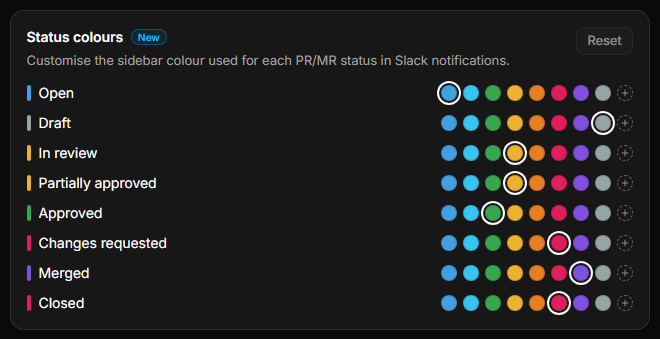
#RRGGBB colour. Reset restores the built-in colours.A saved colour is used the next time that card is posted or updated, including CI-only updates. Messages already in Slack stay as they are until then.
Per-repo channel and label rules are configured under Routing overview. Scheduled stale PR/MR digests are under Reminders.